
Dibcase ACT Features
An AI PDF tool to unlock your SSA practice
Bottom Line: Our tool will save you time and money writing briefs, arguments, or any related AI assisted legal documents.
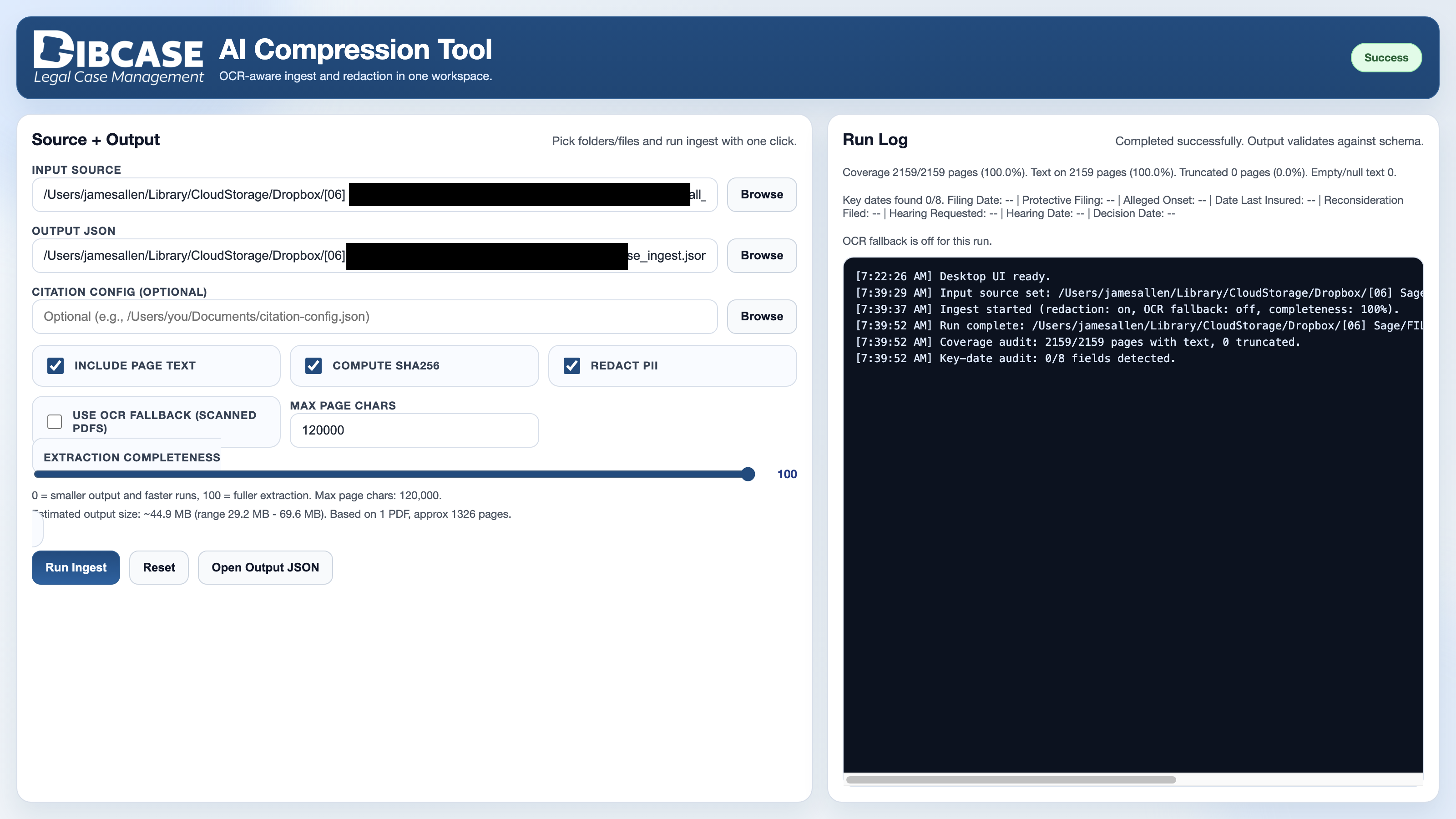
Dibcase ACT helps legal and medical case-review teams ingest PDFs, extract text, detect citations,
redact sensitive data, and export clean JSON for downstream AI workflows.
PDF Folder Ingest
Process a single PDF or recursively scan an entire case folder for PDF records.
OCR Fallback
Extract text from scanned or image-based pages when embedded PDF text is missing or sparse.
PII Redaction
Mask sensitive data such as SSNs, phone numbers, emails, DOBs, names, IDs, addresses, and dates.
Citation Detection
Detect Exhibit, Exhibit Page, and Bates references with confidence and rejection metadata.
Key-Date Audit
Identify important case dates including filing, onset, hearing, decision, and reconsideration dates.
AI-Ready JSON Export
Generate structured dibcase_act.json output with documents, pages, citations, audits, and errors.
Dibcase ACT FAQ
Frequently asked questions.
Dibcase ACT compresses, redacts, and structures case PDFs so legal and medical records can be used safely with frontier AI models, local AI systems, and downstream review workflows.
What does Dibcase ACT do?
Dibcase ACT ingests legal, medical, and administrative PDFs, extracts page text, detects citations, redacts sensitive information, and exports a structured AI-ready JSON file for case review.
How much can Dibcase ACT reduce file size?
Dibcase ACT can reduce case file size by up to 90% by extracting the useful text and metadata from large PDFs into a compact structured format while removing unnecessary document weight.
Does Dibcase ACT redact sensitive information?
Yes. Dibcase ACT includes built-in PII redaction for sensitive data such as SSNs, phone numbers, emails, DOBs, names, IDs, addresses, ZIP codes, dates, and user path information. Redaction can be set to Low, Medium, or High depending on the privacy needs of the workflow.
Can the output be used with AI models?
Yes. Dibcase ACT creates redacted, structured JSON that can be used with frontier AI models and local AI models. The output is designed to be smaller, cleaner, easier to search, and safer to submit into AI-assisted review workflows.
Does it work with scanned PDFs?
Yes. Dibcase ACT includes an optional OCR fallback that attempts to extract text from scanned or image-based pages when embedded PDF text is missing or sparse.
What citations can Dibcase ACT detect?
Dibcase ACT detects Exhibit, Exhibit Page, and Bates references. It also records citation confidence and rejection metadata so uncertain citation candidates can be reviewed.
What kind of output does the tool create?
The tool creates dibcase_act.json, a structured JSON file containing case metadata, document records, page text, citation results, duplicate-page hints, extraction method details, audit data, and processing errors.
Can I process an entire folder of PDFs?
Yes. Dibcase ACT can process a single PDF or recursively scan an entire folder of PDFs, making it suitable for large case files and multi-document record sets.
Does Dibcase ACT validate the output?
Yes. After ingest, the generated JSON is validated against the Dibcase ACT schema. The app reports whether the run completed successfully or completed with warnings.
Is Dibcase ACT only for cloud AI?
No. The redacted JSON output can be used with cloud-based frontier AI models or with local AI systems, depending on the user’s preferred privacy, security, and deployment requirements.